In August I wrote a long post about getting my Creality CR-Scan Pika running on Linux, and one section in it had a very confident heading: Why USB Under Wine Is a Dead End. I had traced the problem down to a single unimplemented function, written it up, and made my peace with it. Scanning went over WiFi, calibration happened in a Windows VM, case closed.
Then I took the scanner to the office to show it off.
At home, the WiFi link had never given me any trouble. In the office it dropped. And dropped again. And again, right in the middle of the demo, which is exactly when you want a piece of hardware to make you look good. A scanner that only behaves at home is not a scanner I am going to carry around, and there is exactly one kind of connection that does not care what room it is in. It has a plug on each end.
So I went back to my dead end and stared at it a bit longer. It turns out there was a door in it.

What It Looks Like Now
Let me start with the good part, because that is what I would want to know first.
In August, a scan session on Linux went like this: switch the scanner into WiFi mode, let a dedicated WiFi dongle get moved into its own network namespace so my VPN interfaces would stop confusing the app, wait for it to find the scanner, and hope the link holds. Calibration meant booting a Windows VM and passing the scanner through to it.
Now I plug in the cable and start CrealityScan. That is it.
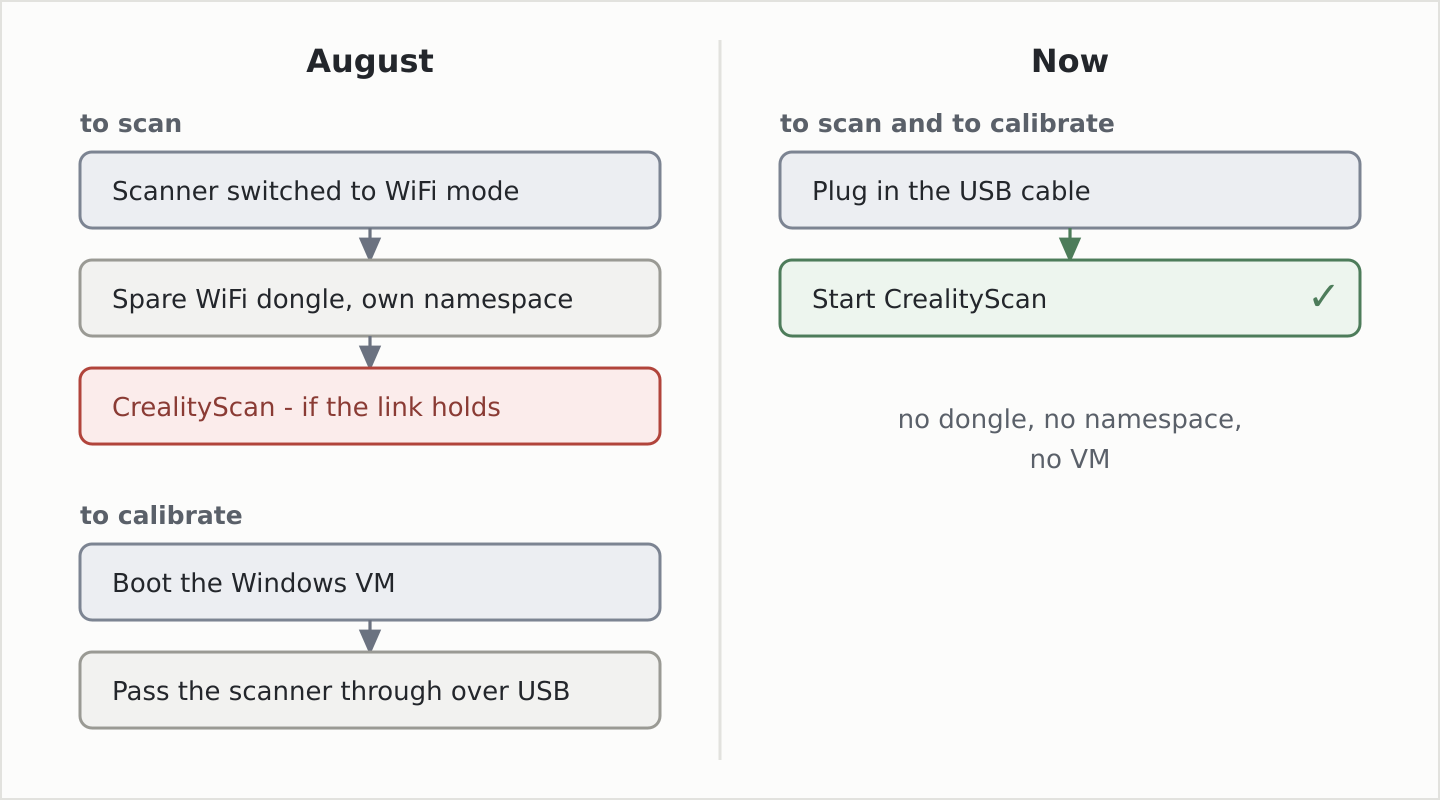
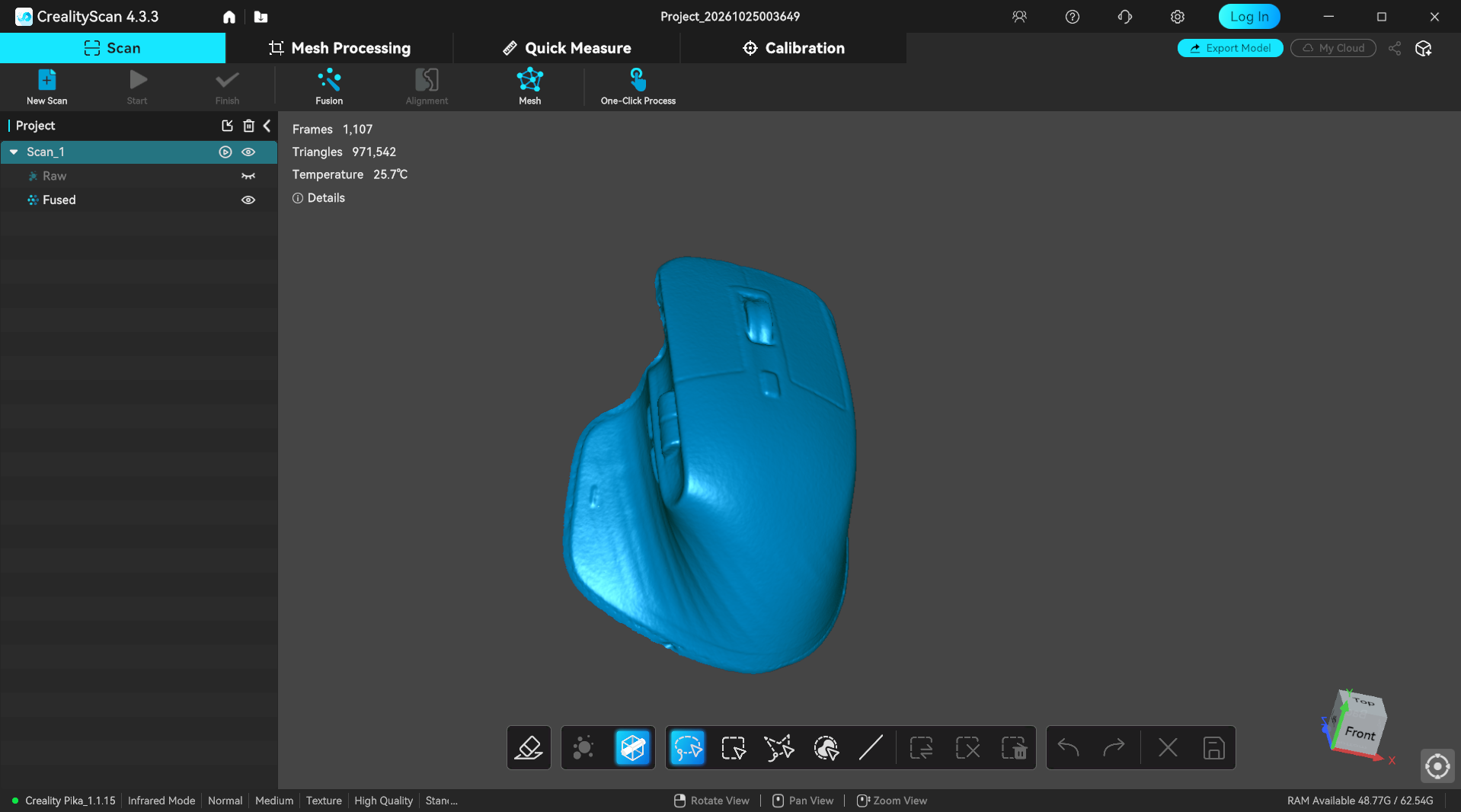
It finds the scanner, scans, calibrates, and even passes the device performance test that used to hang in the VM and forced me to hand-edit the app’s settings file. Here is a computer mouse, scanned entirely over USB, under Wine, on Linux:
The WiFi route still exists as a fallback. The VM is simply out of a job.
The Wall I Had Found
If you missed the first post, here is the short version. CrealityScan is a Windows app. The scanner inside the Pika is an Orbbec depth camera, and Orbbec’s SDK talks to it exclusively through Media Foundation, the Windows camera stack. Wine has a Media Foundation, but when you ask it for a video camera, this is what you get:
fixme:mfplat:MFEnumDeviceSources Not implemented for video capture devices
That line is still true today. What I got wrong was what I did with it. I read it as “Wine needs camera support first”, and camera support in Wine is a big, serious project. It has to work for every webcam, every video call app, every program that has ever opened a camera on Windows. Not something you knock out in an evening.
That is the right long-term answer, and there is an out-of-tree patch set already heading in that direction. Anything that lands in Wine helps everybody. But I did not need Media Foundation to work. I needed it to look like it works, to one DLL, for one scanner. That is a much smaller problem.
And here is the ironic part. The other half of camera support already exists on Linux, and
has for a very long time: uvcvideo, the kernel’s USB camera driver. It had been grabbing
the Pika every single time I plugged it in, and in August I had even written a udev rule to
stop it, so the Windows VM could have the device.
Let Linux Do the Camera
So the idea was simple to say out loud: let Linux handle the camera, and show the Orbbec SDK something that looks enough like Windows to keep it happy.
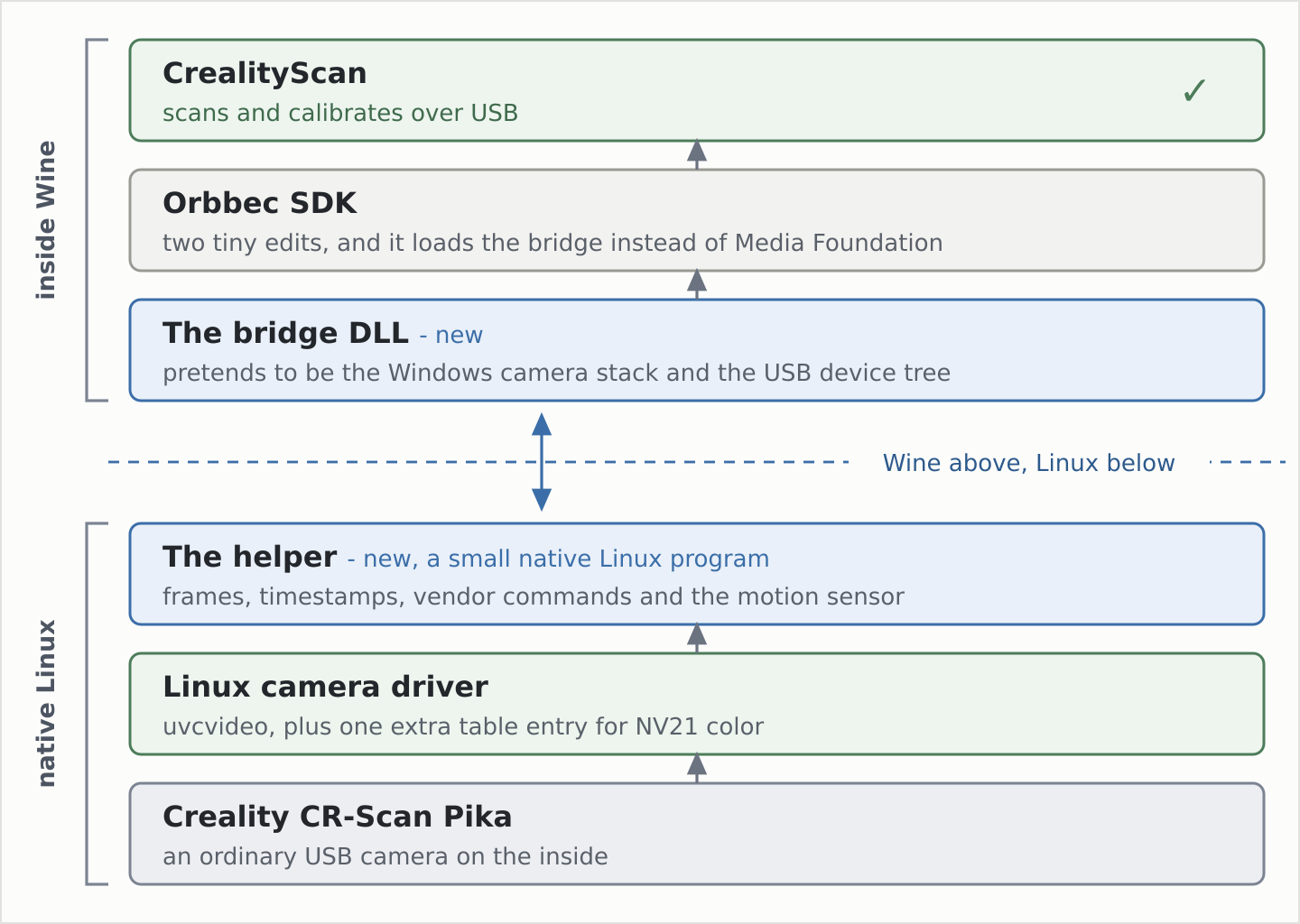
There are two new pieces. A small native Linux program talks to the scanner through the normal Linux camera driver. A DLL inside Wine pretends to be Media Foundation and passes every request across to it. Wine itself never touches the USB device at all.
The fun part was getting that DLL in front of the SDK without patching Wine. The SDK loads
Media Foundation’s MFReadWrite.dll by name, and that name is just a string sitting inside
the SDK’s DLL file. So I replaced the string with the name of my DLL - which, by pure luck,
is exactly one character shorter, so it fits into the old spot without touching anything
else in the file. Windows then loads my DLL right alongside the SDK, before any of the SDK’s
own code runs. At that moment the SDK’s import address table - the list of Windows functions
it is about to call - is already filled in but not yet used, so my DLL rewrites a handful of
its entries: the Media Foundation calls that open cameras, and the device-tree and USB hub
calls you will meet in a second. Only the SDK’s own table changes. Everything else in the
process, and every call that is not about the scanner, still goes to the real Wine.
The SDK Wants to Know Where You Live
I expected to fake Media Foundation. What I did not expect was that the SDK refuses to use a camera unless it can find out where it is plugged in.
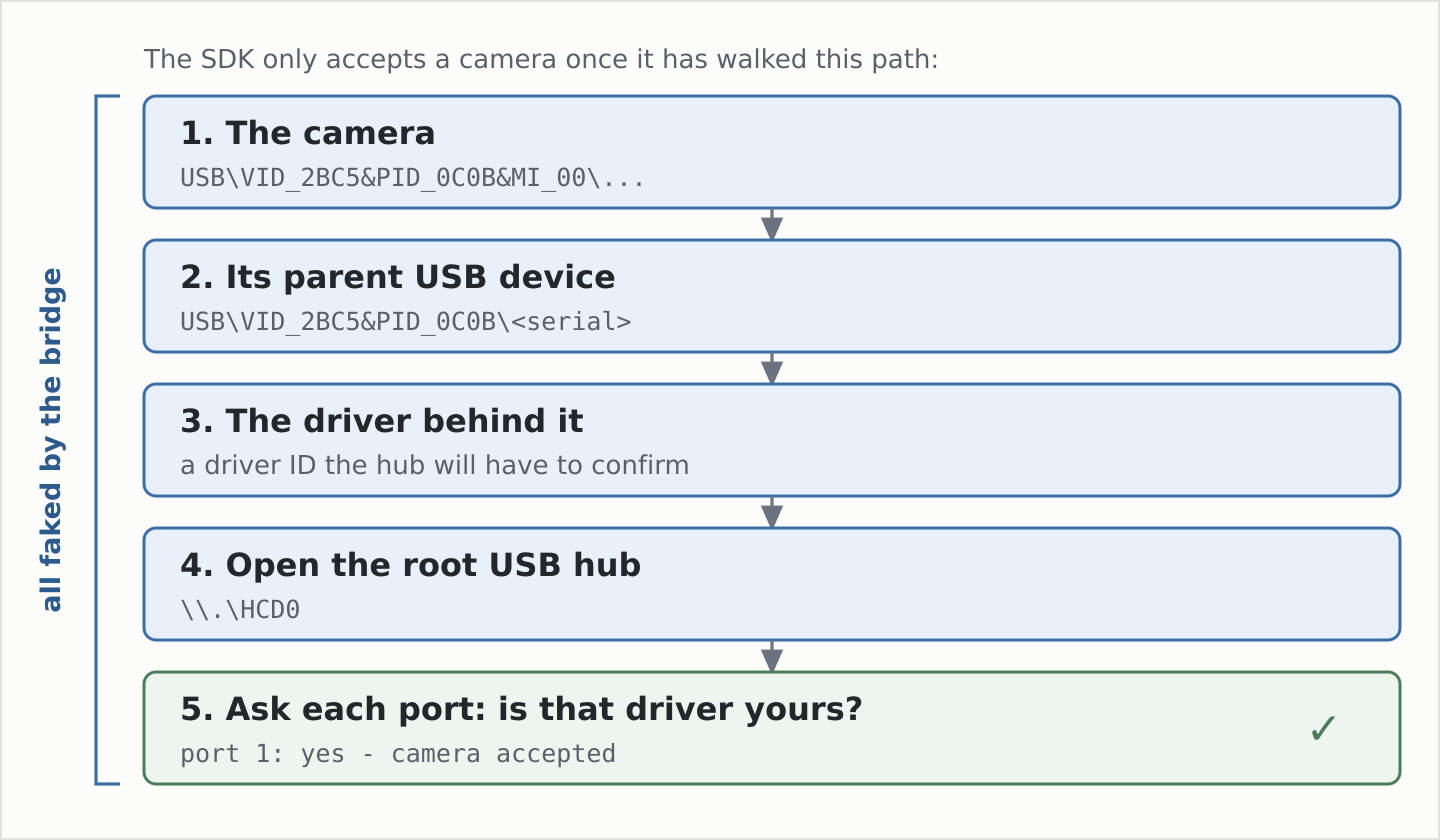
Before it accepts a camera, it goes on a little hike through the Windows device tree: from the camera to its parent USB device, from there to the driver behind it, then it opens the root USB hub and asks it, port by port, until it finds the one the scanner is sitting on. Under Wine there is no hub to ask. So the bridge makes one up, for the scanner and only the scanner, and answers every step of that hike the way Windows would.
The Part Where I Was Wrong
In the first post I said the libusb code inside the SDK was dead code. I was almost right,
and that “almost” was the whole problem.
Before the SDK opens a camera through Media Foundation, it first opens the device through libusb, hands that handle to the camera code, and the camera code… throws it away. Never uses it. On Windows nobody notices, because the open just works. Under Wine it fails, and the SDK gives up before it ever gets to the part I had so carefully faked. Two tiny edits to the SDK fix it: hand over an empty handle and skip the “give up” branch.
A Camera Is More Than Pictures
Getting pictures across is not the same as getting a scan. A camera driver quietly hands over a lot more than images, and a 3D scanner needs all of it.
Timestamps. Every frame comes with a small header: when it was taken, plus some extra Orbbec data tucked in at the end, and the SDK relies on both. Linux has those headers too, just on a separate device node, so the helper pairs each header with its frame and the bridge hands them over together, the way Windows would.
The private command channel. Orbbec talks to the scanner through a vendor-specific “extension unit”, basically a private mailbox on the camera. Everything beyond “please send me pictures” goes through it. Linux has an interface for exactly that, so the helper just passes the messages on.
The motion sensor. The Pika has an IMU, which reports on its own little USB interface. The helper claims that one interface and leaves the cameras alone - grab the whole device and the video streams die. On the Windows side this was the hairiest bit of the whole project, because the SDK expects the motion data to arrive through its own internal objects, and the bridge has to play along very precisely.
The Kernel Spelled It Out for Me
The last missing piece was color, and it came with the best surprise of the project.
The SDK asks for color either as NV12 or as RGB. On Windows, Media Foundation converts whatever the camera sends into that; under the bridge, the bridge has to. NV12 is the easy one if the camera sends NV21 - the two formats differ only in the order of the two color bytes in each pair. RGB takes the full YUV-to-RGB math.
Picking the format the color camera should send took three attempts. MJPEG, the compressed one, came first - until it turned out that starting MJPEG resets some Pika firmware versions, which is a creative way of saying no. YUYV gave me the first moving picture. The format that stuck is NV21. Except Linux could not see it at all. The camera clearly offers it, and the kernel just shrugs:
uvcvideo 2-1:1.3: Unknown video format 3132564e-0000-0010-8000-00aa00389b71
Take the first block of that ID, read the bytes backwards as letters, and you get… N,
V, 2, 1. The kernel is literally telling you the name of the format it does not know.
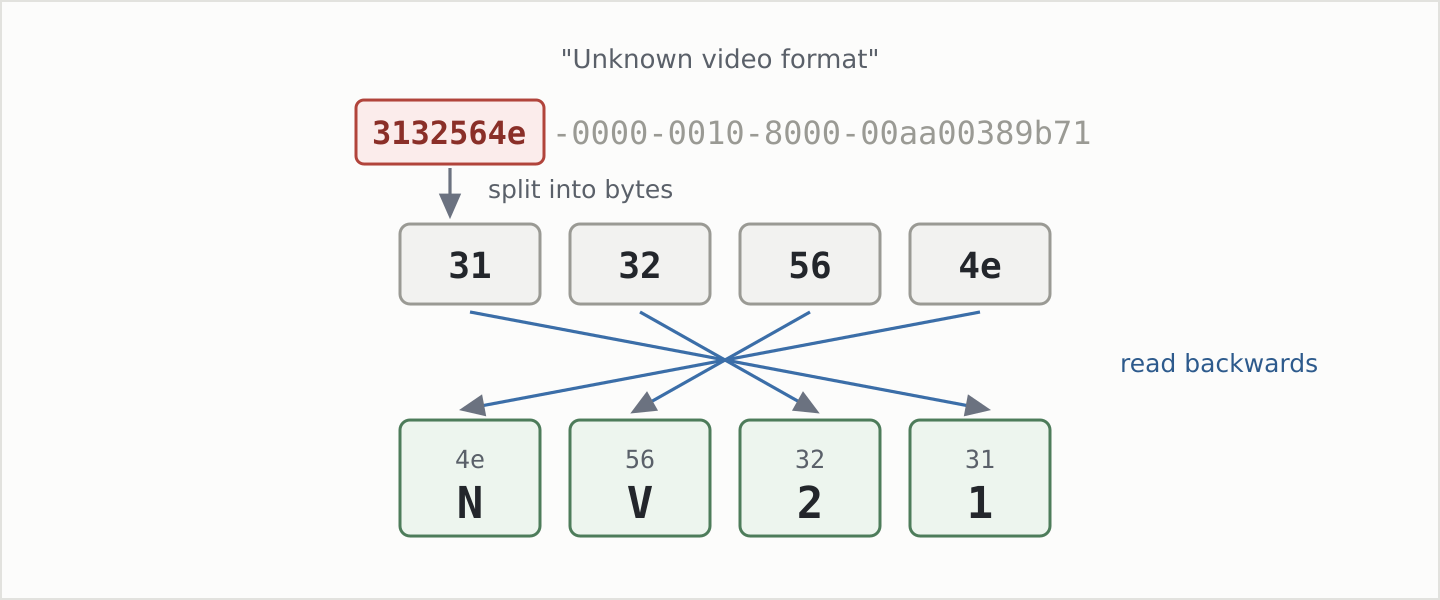
And Linux absolutely knows NV21 - it is just missing from the little lookup table in the USB camera driver, at least up to the 6.18 kernel I run. The whole fix is one entry:
	{
		.guid		= UVC_GUID_FORMAT_NV21,
		.fcc		= V4L2_PIX_FMT_NV21,
	},
If you ever see Unknown video format in your own dmesg, try the same trick on the GUID.
There is a good chance your camera is offering something perfectly ordinary that the driver
simply has no name for, and you do not need a new kernel to fix it - just that one small
module, rebuilt with the extra line.
If You Want to Try This With Your Own Hardware
The scanner is one device, but the trick is not specific to it. Plenty of hardware only ships a Windows app, and a lot of it breaks under Wine for the same reason: the app talks to the hardware through some Windows subsystem Wine does not fully implement. What I would do next time, in this order:
Read the vendor DLL’s imports first. The list of Windows functions it imports tells you exactly which door it uses to reach the hardware. In August that list is what finally told me the truth, after two evenings of chasing the wrong theories.
Find the first stub. Run the app with Wine’s debug output on and look for the first
fixme or “not implemented” on that path. That is your wall.
Check whether Linux already has a driver for the device class. Cameras, HID devices, serial adapters, audio - if the kernel already speaks the device’s language, you do not need Wine to. You only need a translator between the app and that driver.
Fake as little as possible, for as few callers as possible. Hooking only the vendor DLL, and only for the one device, kept everything else in the app on the real Wine code. Less to get wrong, and much easier to debug.
Expect hidden checks. In my case: a hub walk to find out where the device is plugged in, and a libusb handle nobody uses. Vendor code is full of little “is this a real Windows machine?” moments that only show up once the big piece works.
The Hard Parts
It would not be honest to stop at the happy screenshot.
App updates will break it. The two SDK edits and the motion-sensor glue are made for the exact SDK inside CrealityScan 4.3.3. An update does not break things silently - the build simply refuses - but every new version means a bit of detective work before I can use it.
It needs a small kernel module for color, and that only kicks in after a reboot.
Firmware updates over USB are untested. Scanning and calibration work. Updating firmware uses the same channel and should work too, but I have not tried it yet, and that is the one operation where “let’s see what happens” can end with a very expensive paperweight.
It has only ever seen a Pika. Creality’s other scanners use Orbbec cameras too, and a lot of this should carry over, but parts of the bridge are written specifically for the Pika. I would not promise anything for an Otter or a Raptor.
Who this is not for. If WiFi works wherever you scan, the setup from the first post is much simpler and you need none of this. This is for when you do not get to choose the room.

Where This Could Go
A few things I would love to see happen next:
- Get NV21 into the kernel. It is one entry in a table, for a format Linux already knows. On 6.18 at least, any USB camera that advertises NV21 under that GUID gets it dropped just like the Pika does, so this is the smallest piece of the project that could help the most people.
- A head start for camera support in Wine. The bridge is, more or less, a complete list of what one real-world camera app needs from Media Foundation: listing cameras, reading frames, timestamps, vendor commands. That is a much friendlier target than “all of Media Foundation”, and a nice test case for whoever picks that work up.
- Try a firmware update over the cable - carefully - so the VM can go for good.
My NixOS repo is private, so there is nothing to clone, but the whole trick fits in three sentences. Get your own DLL loaded in front of the vendor’s. Answer its questions only for the one device you care about. And let Linux do the hardware part, because it has been good at that for a very long time.
Next time I take the scanner to the office, it comes with a cable. And this time, the demo gets to be about the scan.