I spent the first evening certain it was a udev permissions problem. The second, equally
certain it was WinUSB. The third I spent reading OrbbecSDK.dll’s import table and
finding out it was neither, and that the thing I had been trying to fix could not be fixed
at all.
The scanner is a Creality CR-Scan Pika. Creality ships CrealityScan for Windows, macOS and
Android, and as of 4.3.1 there is no Linux build and no sign of one coming. The scanner
sits on itw, the desktop I actually work on, and the alternative to solving this was
rebooting into Windows whenever I wanted to scan something. That is the kind of friction
that ends with you not scanning things.
What I ended up with is two paths that each do half the job: WiFi under plain Wine, which is what actually scans, and USB into a VMware Windows guest, which is the only way to calibrate. Below is why the split exists, and the NixOS configuration that makes both reachable.
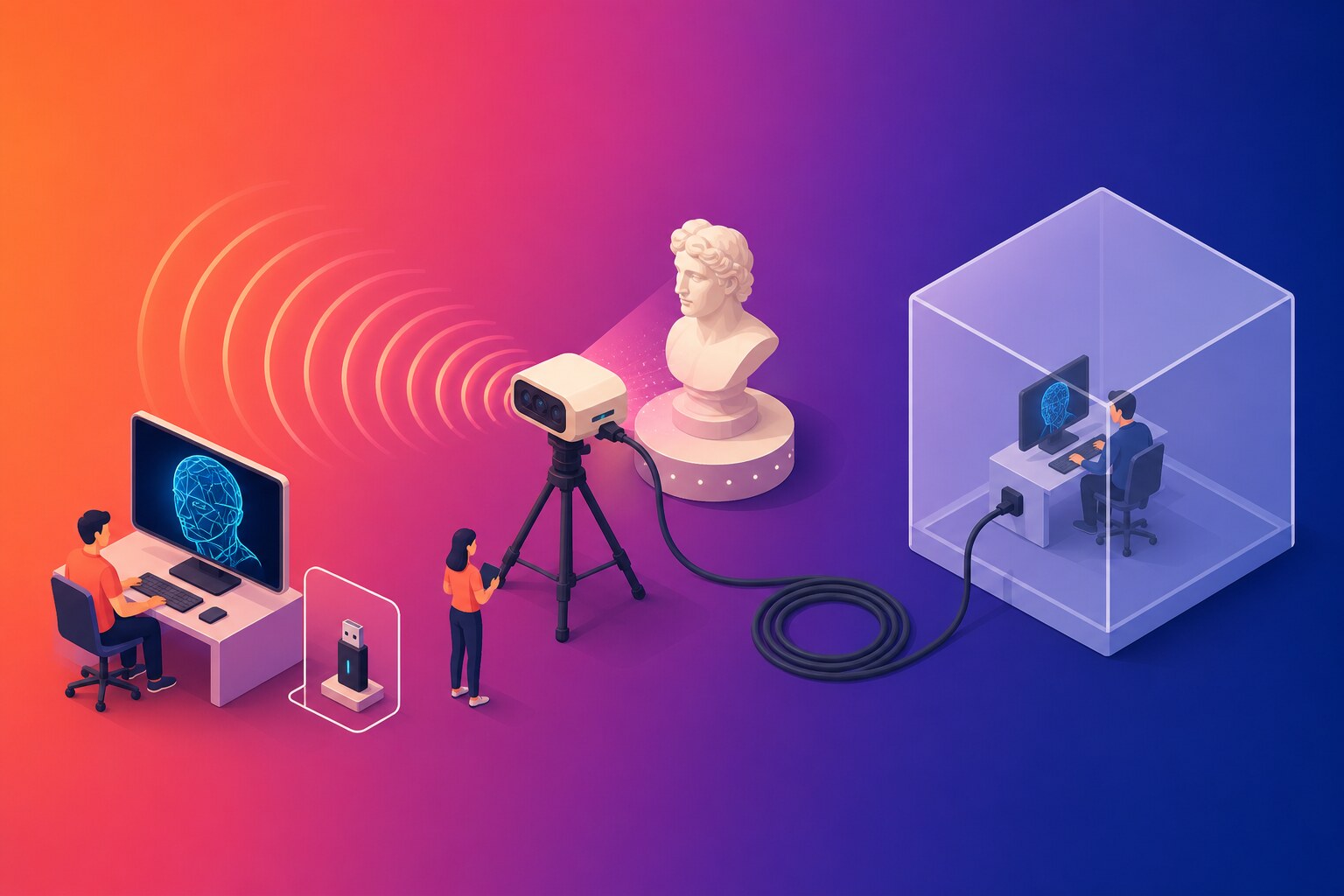
What the Pika Actually Is
The most useful thing I learned is what the device looks like to the kernel, because it rules out most of the theories you would otherwise waste a week on.
Bus 002 Device 006: ID 2bc5:0c0b Orbbec 3D Technology
Creality does not build the depth module. It is an Orbbec unit, vendor 2bc5, and its
siblings share the vendor ID - the CR-Scan Otter is 2bc5:06da - so udev rules written
against the vendor cover the whole family. The app’s own config refers to the same device
in decimal (scannerPid 3083, scannerVid "11205") and internally calls it
SCANNER_RAPTOR_PIKA.
It enumerates as SuperSpeed with five interfaces: 1.0 through 1.3 are UVC video
(class 0e), and 1.4 is HID (class 03). There is no vendor-class interface at
all. This is a plain UVC camera with a HID side channel.
Which means the kernel binds uvcvideo and usbhid to the device on every enumeration,
whether you want it to or not. It means there is no proprietary driver you are missing.
And it means the Windows application reaches the scanner through the Windows camera stack,
which turns out to be the whole problem.
bMaxPower is 896 mA, very nearly the entire SuperSpeed budget. Before blaming
software for a link drop, blame the port. I built a theory on a run of USB disconnect
events with no pattern to them - uptimes between drops from 1m38s to 9m29s - before
working out they were me unplugging the thing. The discriminator for a real fault is a
different port or a self-powered hub, not a config change.
Packaging a Windows Unity App with Nix
CrealityScan is a 64-bit Unity il2cpp application shipped as a roughly 500 MB Inno Setup installer. Nothing in it needs to be executed to install it - no kernel drivers, no .NET, no redistributables - so the derivation is just innoextract and a wrapper script.
installPhase = ''
  runHook preInstall

  innoextract --silent --extract --output-dir . $src

  mkdir -p $out/share/creality-scan
  cp -r app/. $out/share/creality-scan/

  mkdir -p $out/bin
  substitute ${./creality-scan.sh} $out/bin/creality-scan \
    --subst-var-by app "$out/share/creality-scan" \
    --subst-var-by wine "${winePackage}" \
    --subst-var-by dxvk "${dxvk.bin}"
  chmod +x $out/bin/creality-scan

  runHook postInstall
'';
substitute rather than makeWrapper because the launcher is not just an exec line: it
initialises the Wine prefix, installs DXVK into it, and sets WINEDLLOVERRIDES, which
reads better as a script than as a pile of --set flags. The one payload file worth naming
now is CrealityScan_Data/Plugins/x86_64/OrbbecSDK.dll, because the next two sections are
about what is inside it.
There is one trap in the derivation’s signature:
{ lib, stdenvNoCC, fetchurl, innoextract, dxvk, ...
, wine64Packages
, winePackage ? wine64Packages.stagingFull
}:
The argument is called winePackage, not wine, and deliberately so. callPackage fills
arguments by name from pkgs, so an argument named wine would silently get pkgs.wine -
which is the 32-bit build. The app is 64-bit only. Nothing fails at build time either,
because the Wine path is only substituted into a script; you find out when you launch it.
Naming it winePackage keeps callPackage out of the decision and leaves the default
explicit and overridable.
The udev Rule That Has to Load Before 73
The application needs raw access to the USB device node. The obvious rule grants it:
SUBSYSTEM=="usb", ATTR{idVendor}=="2bc5", MODE="0660", TAG+="uaccess"
TAG+="uaccess" is the standard way to hand a device to whoever is logged in at the seat.
Written the obvious way in NixOS:
services.udev.extraRules = ''
  SUBSYSTEM=="usb", ATTR{idVendor}=="2bc5", MODE="0660", TAG+="uaccess"
'';
And it does not work. The device node stays root:root 0660, and the app reports
usb disconnect / connect to device failed! with the scanner plainly plugged in and
plainly visible in lsusb.
The reason is ordering. TAG+="uaccess" does not itself grant anything - it is a marker.
What turns the tag into an actual POSIX ACL is systemd’s 73-seat-late.rules, which
carries RUN{builtin}+="uaccess". udev processes rule files in lexical order, and
services.udev.extraRules lands everything in 99-local.rules. At 99, the tag is set
after 73 has already looked for it. Nothing consumes it, so nothing happens.
The fix is to ship the rules as a udev package, with a filename that sorts before 73:
services.udev.packages = [
  (pkgs.writeTextDir "lib/udev/rules.d/60-creality-scan.rules" ''
    SUBSYSTEM=="usb", ATTR{idVendor}=="2bc5", MODE="0660", TAG+="uaccess"
  '')
];
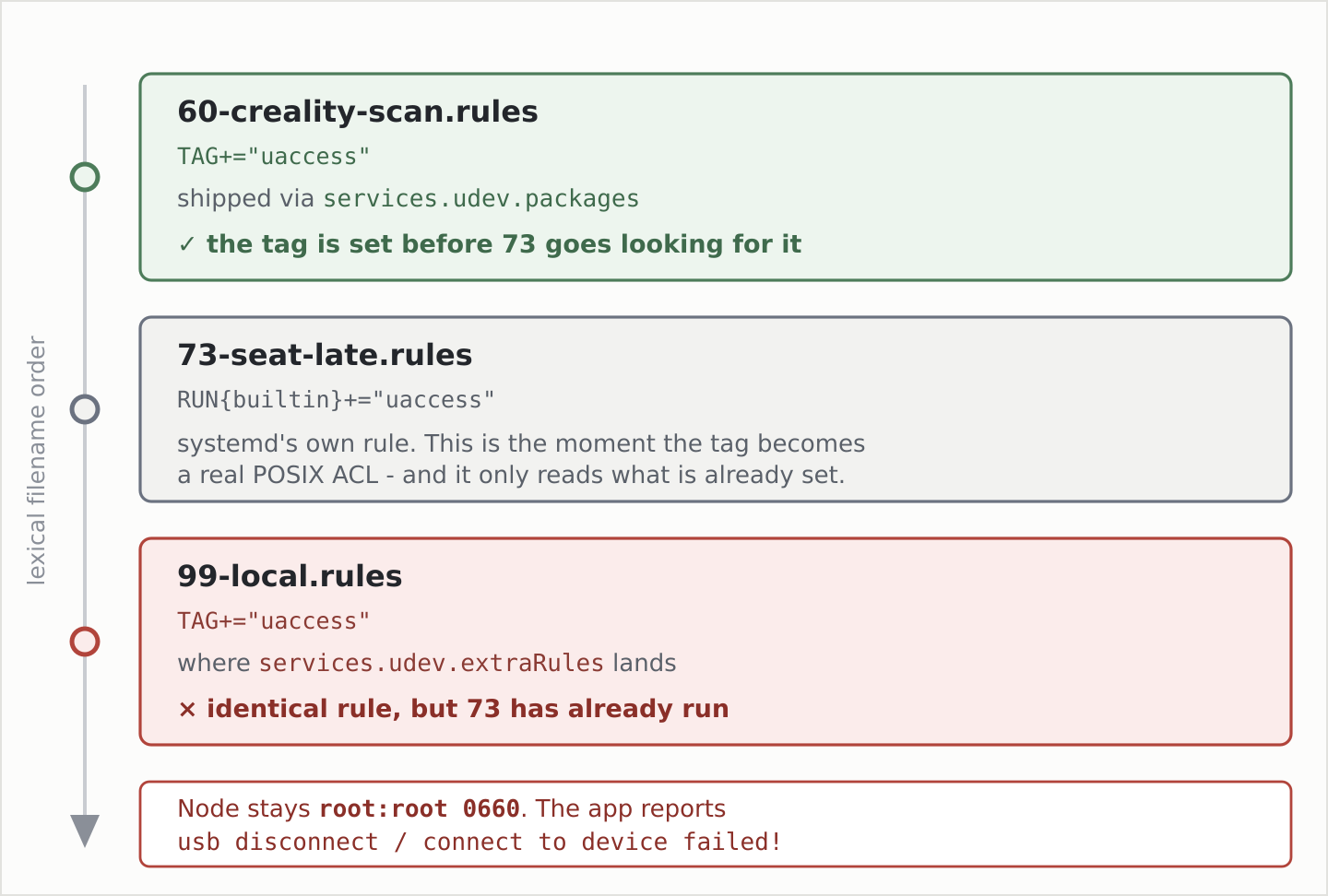
Same rule, different filename, and now it works. This applies to anything that relies on
uaccess on NixOS, not just this scanner, and the failure mode gives you no hint at all
about ordering.
Validate before switching rather than after:
udevadm verify /nix/store/.../60-creality-scan.rules
udevadm test --action=add /sys/bus/usb/devices/2-1 2>&1 | grep creality
udevadm test simulates the add uevent without touching the device. The line to look for
is Running in test mode, skipping writing "0" to sysfs attribute - that is the rule
announcing it matched, and without it you have a rule that never fired.
And udev rule changes take effect on the next plug, not at switch time. A device that is already attached keeps whatever it had, and nothing tells you so.
Why USB Under Wine Is a Dead End
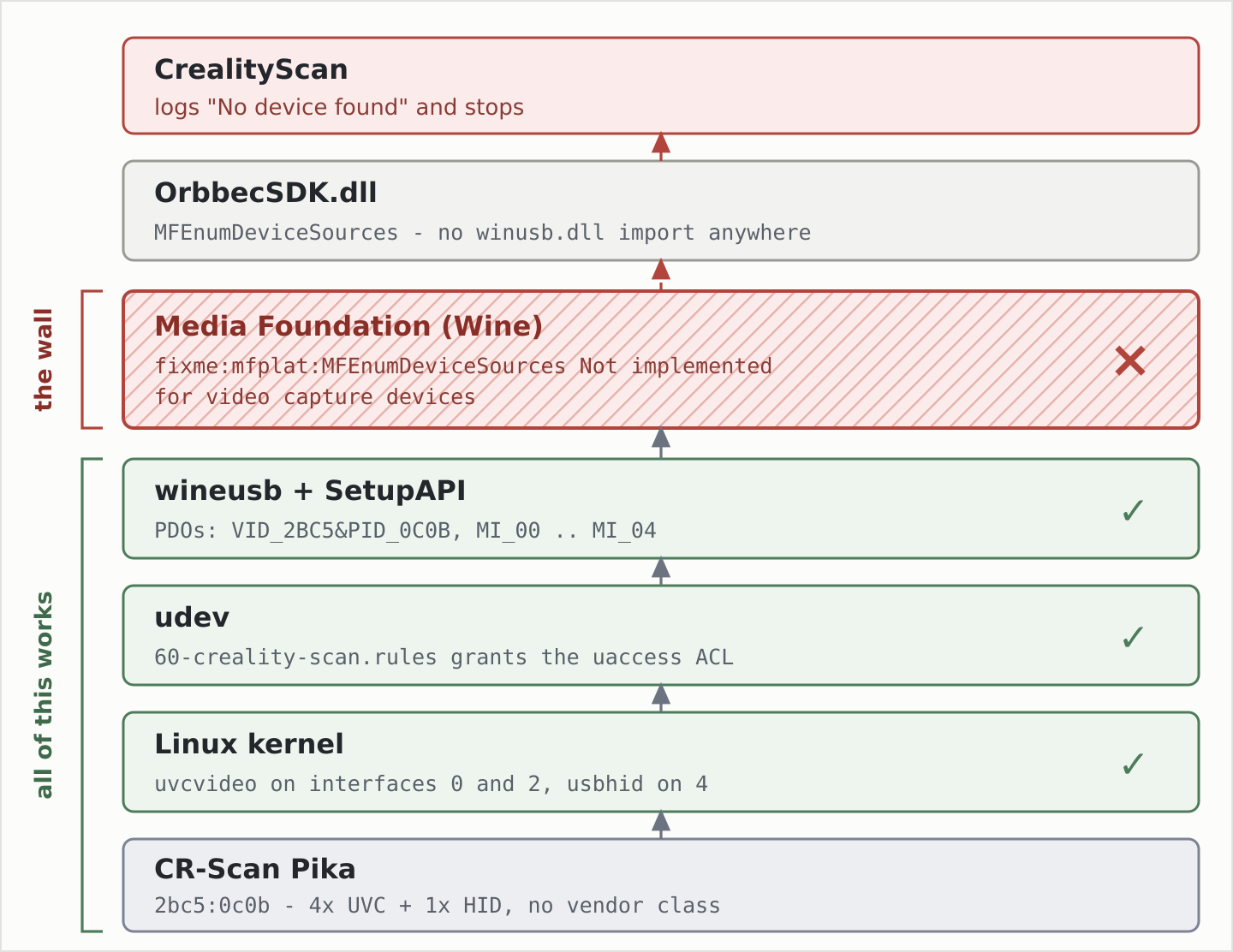
With the udev rule in place, Wine’s wineusb genuinely opens the device and creates the
PDOs. A WINEDEBUG=+setupapi trace shows the application walking the USB enumerator and
finding exactly what it should:
VID_2BC5&PID_0C0B
MI_00 MI_01 MI_02 MI_03 MI_04
It finds the scanner, and then reports “No device found”. That contradiction is what sent me into the DLL.
OrbbecSDK.dll reaches the device purely through Media Foundation. Its import table
is MFEnumDeviceSources, MFCreateDeviceSource and
MFCreateSourceReaderFromMediaSource, plus SetupAPI and CfgMgr32 for enumeration. It
imports no winusb.dll at all. The WinUsb_* and libusb strings you will find
inside the binary, and which sent me down the WinUSB path in the first place, are dead
code from a statically linked libusb that this device never uses.
So it is not a permissions problem, not a WinUSB problem, and not an isochronous transfer problem. It is one function:
fixme:mfplat:MFEnumDeviceSources Not implemented for video capture devices
Wine implements MFEnumDeviceSources for audio capture only. For video it is a stub.
The SetupAPI half of the puzzle works fine, the application walks right up to the device,
asks Media Foundation for a video source, gets nothing, and gives up. Remember the device
is a plain UVC camera with no vendor interface - the camera stack is the only door it has.
Closing that gap means implementing real camera support in
Wine: an IMFMediaSource for capture,
KSCATEGORY_VIDEO_CAMERA device interfaces, and IKsControl over UVC extension units for
the vendor channel. An out-of-tree patch set exists at
poita66/wine on branch test/all-prs, around 850
lines. I read it hoping for a shortcut. Its media source only enumerates: Start() is a
no-op and the presentation descriptor is hardcoded, so it finds the device and never
delivers a frame.
For USB, the answer is a Windows guest. I would rather have written a different sentence here, but that is where the evidence lands, and knowing it is settled is worth something on its own.
The Path That Scans: WiFi in a Network Namespace
Scanning works over WiFi under plain Wine, with live depth reconstruction, and that is the path I use daily.
The Pika raises its own access point, SSID Pika_<serial>, with the WPA passphrase
printed on the device. CrealityScan finds it with GigE-Vision discovery - GVCP, a UDP
broadcast - and then drives the scanner over a vendor TCP link. No Wine USB stack is
involved anywhere in that path, which is precisely why it works. The Media Foundation wall
is a USB-camera wall; over the network the app speaks a protocol Wine never has to
understand.
On a clean laptop you connect to the scanner’s AP and run the app. On itw it did not
work, and the reason is a nice piece of Windows-socket pedantry.
CrealityScan’s GVCP client binds a discovery socket to every local interface and
broadcasts on each one. itw has VPN and Tailscale interfaces: point-to-point TUNs with
no broadcast capability, one of them a zero-MAC wt0. Broadcasting on those fails with
WSAENOTSOCK (10038), and the failures drown discovery. The scanner is never found, and
the app tells you nothing useful about why.
The fix is not to tear down the VPN every time you want to scan something. It is to run the application in a network namespace that contains only a dedicated WiFi dongle, so the noisy interfaces are not visible to it at all:
ox.crealityScan.wifiIsolation.enable = true;
(ox.* is my own option namespace, not anything upstream - substitute your own prefix.)
This is opt-in per host, and correctly so. It only makes sense where there is a spare radio
to hand over. A laptop whose single radio is its uplink should just run creality-scan
normally and let the scanner join the LAN.
The launcher builds the namespace, moves the radio in, associates, and gets a lease:
ip netns add "$CS_NETNS"
iw phy "$phy" set netns name "$CS_NETNS"
ip netns exec "$CS_NETNS" ip link set lo up
ip netns exec "$CS_NETNS" ip link set "$dev" up
ip netns exec "$CS_NETNS" wpa_supplicant -B -i "$dev" -c "$conf"
ip netns exec "$CS_NETNS" dhcpcd -4 -q -t 20 "$dev"
Bringing lo up is not decoration: a fresh namespace has loopback down, and things fail
strangely without it. The launcher matches the AP by prefix rather than pinning a serial,
so the config survives a replacement scanner, and the passphrase comes from a
sops-nix secret rather than the script.
Three things I got wrong on the way to that working.
Moving a radio is per-phy, not per-interface. iw phy ... set netns takes the whole
physical device. If your dongle exposes more than one netdev they all move together, and
the host loses all of them at once.
A dead run leaves the radio inside the namespace. If a previous launch died without
tearing down, the dongle is simply invisible to the host and every diagnostic you run is
misleading. There is a --down flag for exactly this, and it is the first thing to run
before debugging anything else.
The privilege boundary eats your session environment. The launcher re-execs itself
through sudo for the namespace setup, then drops back to the invoking user for the GUI.
Get that wrong and the app inherits root’s XDG directories, which produced my favourite
bug of the whole project. The app shells out to xdg-open for the Creality OAuth login
page. HOME was correct, so ~/.config/mimeapps.list and its
x-scheme-handler/https=firefox.desktop pin were read as intended. But xdg-mime only
honours a default whose .desktop file it can actually locate, and Firefox is installed
per-user in ~/.nix-profile/share/applications, which is not on root’s search path. The
pin was silently discarded, lookup fell through to the system mimeinfo cache, and my login
page opened in some other browser entirely. So the launcher now carries --display,
--wayland, --runtimedir, --datadirs and --configdirs across the boundary
explicitly.
There is a NixOS-specific consequence of that sudo re-exec worth knowing about. The
nopasswd rule has to target the launcher’s exact store path, so the rule and the script are
generated together:
security.sudo.extraRules = [ (oxutils.sudo.nopasswd wifiLauncher "creality-scan-wifi") ];
Change one character in the shell script and its derivation hash changes, so the rule must be regenerated with it or the launcher stops being able to elevate. Deriving the rule from the package rather than hardcoding a path keeps the two in step automatically.
One last environment detail: pin the discrete GPU’s Vulkan ICD, or DXVK quietly falls back to llvmpipe and you will blame the scanner for being slow.
icd=/run/opengl-driver/share/vulkan/icd.d/nvidia_icd.json
if [ -e "$icd" ]; then env_args+=("VK_ICD_FILENAMES=$icd"); fi
DXVK and OpenCL Have to Coexist
Connecting is not the same as scanning. The live depth reconstruction has two graphics requirements that pull against each other.
export WINEARCH=win64
export WINEDLLOVERRIDES="${WINEDLLOVERRIDES:-mscoree,mshtml=;d3d11,dxgi=n}"
mscoree,mshtml= disables the Mono and Gecko install prompts. d3d11,dxgi=n selects
native DLLs, which is how DXVK gets loaded.
DXVK is required. Wine’s builtin wined3d renders the UI perfectly well, which is
exactly what makes this confusing - everything looks fine until you press the button that
starts a scan, at which point the D3D11 load spikes and it crashes.
Host OpenCL is required, separately, because the Orbbec depth engine uses it.
Proton does not work, even though Proton bundles DXVK and is the obvious thing to reach
for. Its Steam runtime container hides the host NVIDIA OpenCL ICD, so the application
enumerates 0 GPU devices and the scan fails. That it fails differently from the wined3d
crash is the useful part: two distinct failure modes meant two distinct requirements.
Plain Wine plus DXVK gives both, and it is the only combination that scans. The Wine launcher installs the bundled DXVK DLLs into the prefix idempotently, keyed on the DXVK store path:
if [ "$(cat "$WINEPREFIX/.dxvk-version" 2>/dev/null || true)" != "$dxvk" ]; then
  for f in d3d11.dll dxgi.dll d3d10core.dll; do
    install -m644 "$dxvk/x64/$f" "$WINEPREFIX/drive_c/windows/system32/$f"
    install -m644 "$dxvk/x32/$f" "$WINEPREFIX/drive_c/windows/syswow64/$f"
  done
  printf '%s' "$dxvk" > "$WINEPREFIX/.dxvk-version"
fi
Keying on the store path means a DXVK upgrade refreshes the prefix automatically and a
re-run does nothing. The application itself lives read-only in the Nix store and is started
through the Z: drive, so the prefix holds only Wine state, DXVK and the app’s own
AppData.
If the scanner connects and then fails at scan start, it is a graphics or OpenCL problem, not a network one.
Calibration Needs a Real Windows Guest
You cannot calibrate over WiFi, and this is not a Wine limitation or a Linux limitation. The device says so itself:
"IsCalibratable": true,
"IsWifiCalibratable": false,
"IsUpdatable": true,
Calibration is USB-only by device policy. Since USB under Wine is settled, that means a Windows guest, which on my enduser hosts is on by default:
ox.vmware.enable = lib.mkDefault role.enduser;
That is a thin wrapper over the upstream virtualisation.vmware.host.enable, pulling in
the vmmon and vmnet modules and vmware-usbarbitrator, the piece that actually does
USB passthrough. Workstation Pro has been free for commercial, educational and personal use
since 17.5.2 in November 2024, so there is no license key involved.
VMware rather than QEMU for one specific reason: its SVGA3D gives the guest a genuine D3D11 device backed by the host GPU. CrealityScan is a Unity D3D11 application and would otherwise land on Windows’ WARP software renderer.
The caveat, before you get ambitious: the VMware vGPU exposes no OpenCL, and the Orbbec depth engine needs it. This is the same wall Proton hit, arrived at from a completely different direction. Firmware upgrade does not touch the depth engine; live depth reconstruction does. Do not expect to scan in the guest. The guest is for calibration and firmware, and that is all.
The SET_CONFIGURATION Race
The Pika is a plain UVC device, so on every enumeration the kernel binds uvcvideo to
interfaces 0 and 2 and usbhid to interface 4. This happens at device registration, before
udev runs and well before VMware gets anywhere near it. VMware then force-detaches them:
USBGL: Failed to claim device interface(0), retrying.
USBGL: Disconnecting driver 'uvcvideo' from interface(0).
USBGL: Disconnecting driver 'uvcvideo' from interface(2).
USBGL: Disconnecting driver 'usbhid'   from interface(4).
That mostly works. What it loses is the one thing that matters. While the interfaces are
still claimed, the guest’s SET_CONFIGURATION is refused by the host kernel, and VMware
fakes the result:
kernel: usb 2-1: usbfs: interface 0 claimed by usbfs while 'vmx-vcpu-1' sets config #1
vmx:    USBGL: Failed to set device to config(1): work around triggered.
Windows now believes it configured the device. The host never re-applied the configuration. Control transfers still work, so enumeration succeeds, the device shows up in Device Manager, CrealityScan sees it, and firmware chatter goes back and forth quite happily. Sustained streaming stalls. Everything you would normally check to confirm the passthrough is healthy reports that it is healthy.
The fix is to make sure no host driver ever holds the device: unconfigure it on plug, so
VMware receives it clean and its SET_CONFIGURATION actually lands.
ACTION=="add", SUBSYSTEM=="usb", ENV{DEVTYPE}=="usb_device", ATTR{idVendor}=="2bc5", ATTR{bConfigurationValue}="0"
Shipped in the same 60- file as the uaccess rule, behind
ox.crealityScan.udevRules.reserveForGuest, which defaults to on.
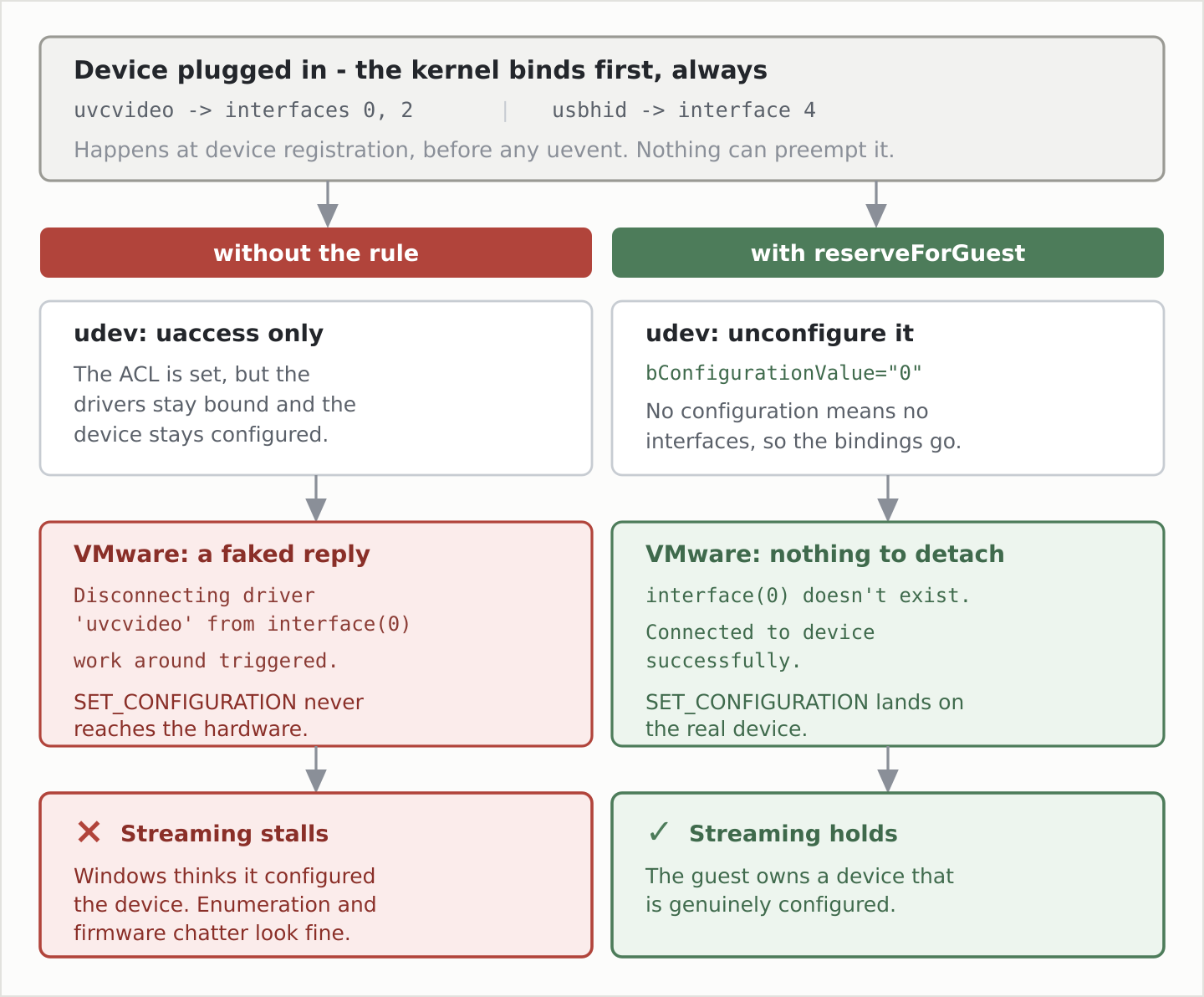
Three mechanics behind that one line:
driver_override is not available here. USB interfaces do not expose it - only PCI
and platform buses do, which I confirmed on kernel 6.18. Unconfiguring the whole device is
the route that actually exists.
udev cannot preempt the kernel’s driver binding. Binding happens at device registration, before any uevent is delivered, so no rule can get there first. The rule tears the binding down immediately afterwards instead, which is early enough.
The ENV{DEVTYPE}=="usb_device" guard is belt and braces. Interfaces carry the IDs as
ATTRS{} rather than ATTR{} and would not match anyway, but being explicit costs
nothing.
This does cost something, knowingly: with no configuration there are no interfaces, so
wineusb’s SetupAPI enumeration breaks. Given that path only ever got as far as creating
PDOs before dying at Media Foundation, it buys nothing and I gave it up without regret. The
uaccess half of the rule stays, because vmx runs as the desktop user and wants the
usbdev node.
Verifying It, and the Trap in Verifying It
Do not check sysfs after the guest has attached the device. Once VMware connects and
the guest sets the configuration, you will see bConfigurationValue=1 and five interfaces
bound to usbfs. That is the expected success state, not a failure, and it looks exactly
like the bug. Checking before the guest attaches is also unreliable: the window between
enumeration and VMware attach can be as little as a second, even though the kernel’s own
driver binding beat it there by a wide margin.
The reliable evidence is in vmware.log, next to the .vmx. Success looks like this:
USBGL: Ignoring claim interface failure: interface(0) doesn't exist.
USBGL: Connected to device successfully.
USBGL: Claimed device interface(0..4) successfully.
interface(N) doesn't exist is the signal you want. It means the device arrived
unconfigured. Three failure signatures should all sit at zero:
grep -c 'work around triggered'   vmware.log      # was 1 per attach
grep -c 'Disconnecting driver'    vmware.log      # was 3 per attach
journalctl -k | grep -c 'claimed by usbfs while'  # was 1 per attach
uvcvideo and hid-generic lines still appearing in the kernel log at plug time are
expected and harmless - the kernel binds before udev runs, and udev tears it down. Their
presence is not evidence of failure. VMware finding no interfaces is evidence of success.
To find out who owns a device, ask the arbitrator rather than the process table:
journalctl -u vmware-usbarbitrator | grep -i 2bc50c0b
# owner:Windows 11 x64
vmx runs as the desktop user, so its /proc/<pid>/fd is not readable by other users and
an empty fuser or lsof result proves nothing at all.
settings.dat Is Plain JSON
CrealityScan gates calibration and firmware upgrade behind a device performance test run by
its PerformanceCheckService. In the VMware guest that test hangs, which puts both of the
things the guest exists for out of reach. The log is at least honest about what it is
looking for:
[Warning] Key 'PerformanceTestDevices' not found in settings.
The application’s configuration lives at
%LOCALAPPDATA%\Creality\CrealityScan\settings.dat, and despite the extension it is plain
JSON, unencrypted and directly editable. Seeding a PerformanceTestDevices entry for the
scanner’s serial makes the app skip the test, which I verified works. Close the application
first - it rewrites settings.dat on exit and will clobber the edit.
If the scanner has ever run against another machine, including the Wine prefix on the host,
that settings.dat already holds a genuine entry. Copy it rather than hand-building one,
adjusting connectionType (the literals are "USB" and "Wi-Fi") and the matching
IsUsb* and IsWifi* booleans.
The app’s state on disk is the best diagnostic surface it has, and it is split across two
directories that are easy to confuse. settings.dat and Logs\<timestamp>\ sit under
%LOCALAPPDATA%\Creality\CrealityScan\; the Unity log, the downloaded firmware payload and
DataCache\ sit under %LOCALAPPDATA%Low\..., which is AppData\LocalLow, a different
path entirely.
device_info.json, in the newest log directory, gives you the device’s own view:
{"deviceName":"Creality Pika","serialNumber":"...","firmwareVersion":"1.1.1"}
and DataCache\DownloadFirmware_SCANNER_RAPTOR_PIKA over in LocalLow tells you what the
OTA server offered. Reading both together resolved a line that had me stuck for a while:
[FirmwareUpgradeManager] PreDownloadAsync#SCANNER_RAPTOR_PIKA: local firmware is up to date, skipping.
That refers to the downloaded payload being current, not the device. A scanner on 1.1.1 with 1.1.10 already sitting in the cache produces exactly that message.
If the upgrade prompt never appears at all, there is a second key to check, misspelling and
all: DonnotRemidDevicePidFwVersion_SCANNER_RAPTOR_PIKA. It is a “don’t remind me” list,
and an empty versions array in it means nothing is suppressed. If the version being
offered is listed there, clearing the array brings the prompt back.
To be clear about what the PerformanceTestDevices edit is: it bypasses a check the
application performs on itself. That is fine on my own hardware and it is what makes
calibration reachable when the check is broken in a VM. It does not make the guest meet the
requirements the check was testing for. There is still no OpenCL in there.
Is the Scanner Actually Any Good?
Everything above is about making the thing work, which is not the same question as whether it was worth making work.
So far, yes. The first real job was a cradle to hold a remote control under the edge of my desk, and it went from scan to printed part without a fight. Here is the scan mesh dropped into FreeCAD with the sleeve modelled around it:
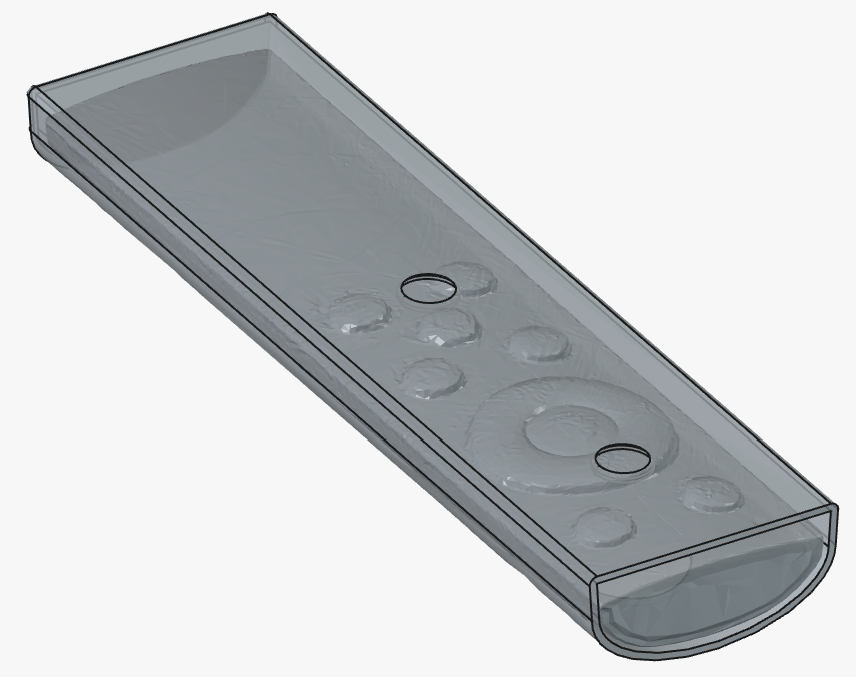
That picture is the entire argument for owning a scanner. The remote is compound curves and soft tapers all the way round, and measuring it into a snug fit by hand would have been an afternoon with calipers and a lot of guessing. With the mesh in the document you model against the object itself. It also shows honestly what the scan gives you: the button pads come through as distinct raised shapes and the overall form is right, with some noise across the flat areas that costs nothing for a part which only has to clear the surface.
Printed, it holds:
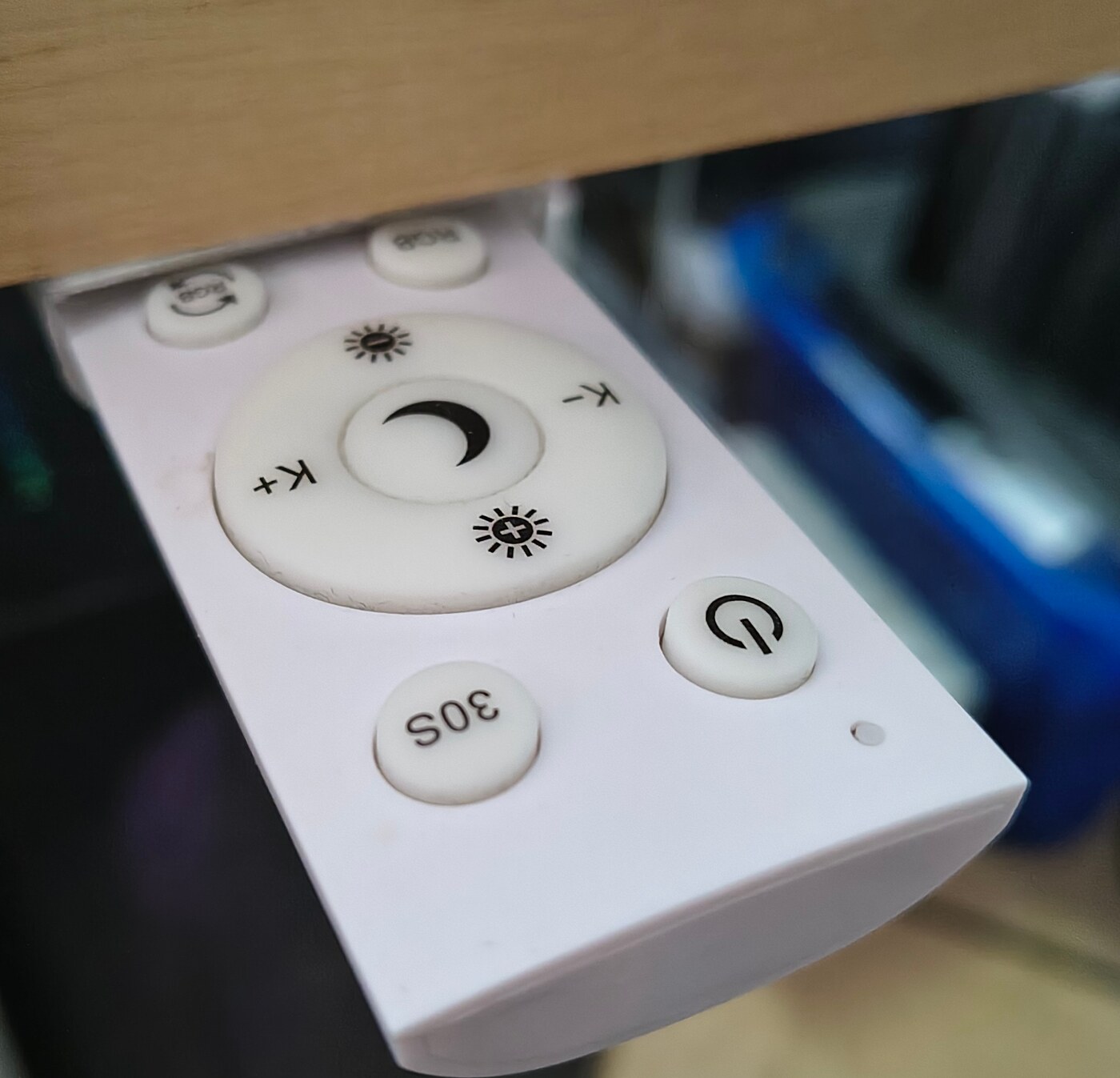
It grips firmly enough to hold the remote half extended, which turns out to be the useful part: turning the light on means sliding it down and pushing it back, rather than pulling it out and finding somewhere to set it down. That is a tolerance question, and tolerance is what hand measurement gets wrong on a rounded object - slightly loose and it drops out, slightly tight and it will not slide at all.
It is early days, so read that as a first impression rather than a settled verdict.
My one real complaint is not technical. CrealityScan’s interface is big buttons and color everywhere, the visual language of a phone app that happens to open on a desktop. Nothing about it is broken and it works fine once you know where things are - I would just rather have had something compact and purely functional, tool density instead of kiosk friendliness. That is taste rather than a defect, and it is the one part of this whole exercise I cannot fix with a udev rule.
The Hard Parts
No single path does everything. Scanning is WiFi under Wine. Calibration is USB into a Windows guest. There is no configuration where one of them covers both, and switching between them is a physical act involving the scanner’s mode and a dongle. If that sounds tiring, it is.
Firmware over WiFi is an open question. The device declares IsCalibratable and
IsWifiCalibratable: false, so calibration is unambiguous. For updates there is only
IsUpdatable: true and no IsWifiUpdatable flag exists at all, which suggests firmware
over WiFi may well work and would skip the VM entirely. I have not tested it. I would
rather leave that marked open than guess at it, and if it turns out to work then the note in
my own module is too broad and should say calibration only.
reserveForGuest deliberately breaks something. Unconfiguring the device on plug means
the host cannot open the scanner as a plain UVC camera either. That is the right default
here because nothing on my Linux side wants to, but if you have something native that does,
turn it off.
udev changes need a replug, not a rebuild. Nothing warns you.
Who this is not for. If you have one machine, one radio, no appetite for running a Windows VM, and you scan occasionally, dual-booting is not the wrong answer.
Where This Leads
The whole split comes down to one missing piece of software. If Wine gains real Media
Foundation video capture - an IMFMediaSource that actually starts,
KSCATEGORY_VIDEO_CAMERA interfaces, IKsControl over UVC extension units - then USB works
under Wine, calibration stops needing a Windows guest, and both paths collapse into one. The
out-of-tree patches show the shape of it, but enumeration without frame delivery is the easy
nine tenths.
Three threads I would pull next, in order of how much they would actually change:
- Test firmware upgrade over WiFi. Cheapest experiment here, and it would either remove the VM from the firmware path or settle the question properly.
- Try the scanner as a plain UVC camera on the host. It is a UVC device with no vendor
interface, which means
v4l2should see something withreserveForGuestoff. Whether the depth stream is usable without the Orbbec SDK is a different matter, but nobody has to guess - the interfaces are right there. - Push on the Wine side. The failing call is named, the patch set exists, and the gap between “enumerates” and “delivers frames” is well defined.
My NixOS repo is private, so there is no clone link to give you, but there is nothing in it
this post has not quoted: a derivation that runs innoextract and substitutes store paths
into a launcher, a module emitting two udev rules and a netns wrapper, and a few lines
turning on VMware. The three things that cost me the most time are the cheapest to get
right: name the udev file 60-, put DXVK on plain Wine rather than Proton, and do not go
looking for WinUSB.